What counts as an invalid click
Google uses "invalid traffic" for all clicks and impressions that do not come from genuine user interest. That includes manual clicks meant to drive up an advertiser's costs, automated clicking tools, bots and crawlers, and malicious software. Accidental clicks such as the second click of a double-click count as well. "Click fraud" in the narrower sense means the deliberate part: competitors draining someone else's budget, click farms, and bot networks generating ad revenue on sites in the Display Network.
Advertisers face two kinds of damage. The direct one is paid clicks with nothing behind them. The indirect one often weighs more: bots that fill in forms or trigger conversions corrupt exactly the data Smart Bidding learns from. The bidding system then learns to buy more of that traffic.
What Google filters and credits on its own
Google describes a two-stage system. A dedicated traffic quality team works with automated filters, machine learning, and manual reviews; the processes are accredited by the Media Rating Council.
- Before billing: clicks the filters flag as invalid while the billing period is still open are not charged. They show up in the "Invalid clicks" column, which you add in the campaign view via the columns icon. No refund is needed here, the money was never charged.
- After billing: if Google detects invalid activity only after the billing period has closed, you get a credit. It appears as a separate "Invalid activity" line on a later invoice and in the transaction history.
"Google refunds" is therefore only half right. Google credits: the amount goes back into the ad account as a balance and is offset against future costs. There is no payout.
Google is also expanding detection. In August 2025 the company reported that systems based on large language models had cut invalid traffic from deceptive or disruptive ad placements in mobile apps and on websites by 40%. That mostly concerns display and app inventory, less so classic search.
New: the Invalid Activity Credit Report
For a long time these credits were just one line on the invoice, with no link to individual campaigns. On June 1, 2026 Google published a dedicated help page for the Invalid Activity Credit Report for the first time. Google does not say whether the report is new or merely documented for the first time. It lives in the Report Editor under Campaigns, in the template gallery as "Invalid Activity Credit Report: Search & PMax".
The report adds three credit metrics (credited clicks, credited interactions, credited amount) and seven adjusted values: cost, clicks, interactions, CTR, average CPC, conversion rate, and cost per conversion, each after deducting the credits. For the first time you can see which campaign and which network had the most invalid clicks detected after the fact, and how the campaign performs without them.
The limit: the report only covers Search and Performance Max. Display, Video, Demand Gen, and App campaigns are missing, which are precisely the campaign types whose inventory is considered more exposed.
The Click Quality Form: still current?
Yes. Google's current help on invalid traffic and the new Credit Report page both still point to the Click Quality Form. It is meant for suspected invalid clicks, and also for low-quality form submissions, clicks outside the targeted area, and sudden cost spikes. The ground rules:
- 60 days: only the last 60 days are reviewed. If you only notice something in the quarterly report, you are too late for the start of the quarter.
- Details: the 10-digit customer ID, date range, affected campaigns and keywords, plus a justification. A report becomes solid with server logs showing IP address, user agent, timestamp, and GCLID of the suspicious clicks.
- Duration: Google speaks of several days. Advertisers report anything from a few weeks to several months with repeated follow-ups. Submitting a report does not create a claim to a credit.
Our take: the form is worth it for clear, provable outliers, such as an overnight cost spike with clicks from data centers or a series of identical spam leads. For steady background noise of a few percent the effort usually exceeds the return, especially since part of it is already filtered or credited automatically.
Our measurement: 4.6% on a €50,000 budget
One of our clients runs ClickCease as a measuring instrument. The account spends around €50,000 a month on Google Ads in a highly competitive market with correspondingly high click prices. If competitors drain budgets anywhere, it is in an environment like this. The screenshots cover September 28 to October 5, 2026.
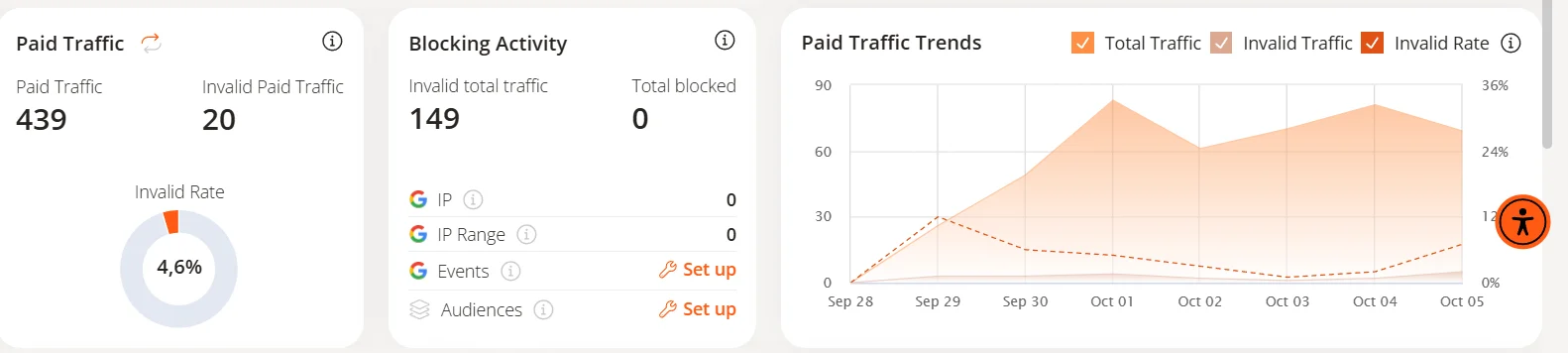
Three things stand out:
- 4.6%, not 20%. Of 439 paid clicks, ClickCease classified 20 as invalid. That matches independent measurements for search and is far below the 14 to 22% circulating in many vendor blogs.
- Suspicion, not proof. The tool files all 20 flagged paid clicks under "Invalid Suspicious Activity", meaning suspicious behavior. Across the whole website ClickCease counted 17 bot requests (1.65% of all requests): 9 automation tools and 8 bots classified as malicious. The dashboard shows no pattern pointing to competitors deliberately draining the budget.
- Measured is not prevented. Nothing was blocked in the period, so "Mitigated Risk" consistently reads 0. As long as exclusions are not set up, a protection tool is a measuring instrument.
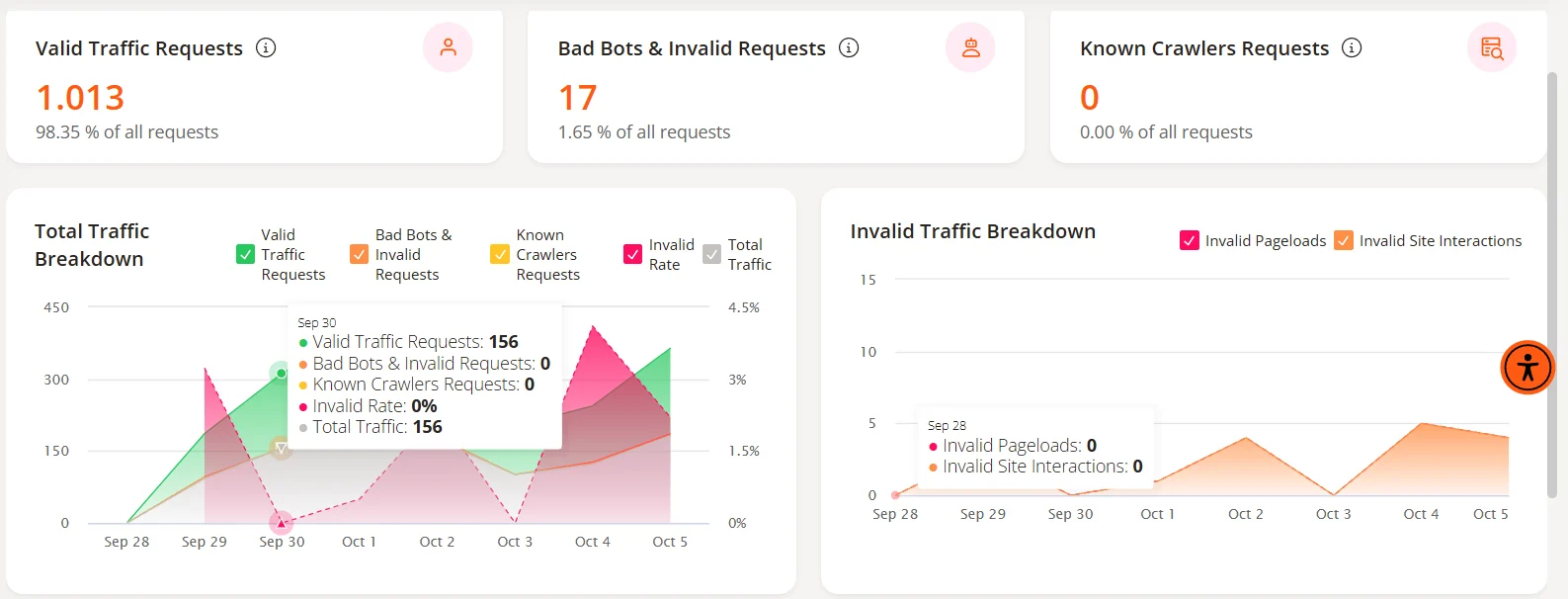
One caveat belongs here: ClickCease sees who lands on the website; Google sees what gets billed. Some of the 20 clicks were probably caught by Google's own filters too and never charged. Before converting the figure into euros, the next step is to compare it with the "Invalid clicks" column and the Credit Report for the same period. The 4.6% is the upper bound of possible damage, not a confirmed loss.
Is ClickCease worth it?
ClickCease has belonged to CHEQ since its acquisition and is now marketed as CHEQ Essentials. The principle: a tag on the website, added via Tag Manager, a WordPress plugin, or directly in the code, checks every visit with more than 2,000 behavioral tests according to the vendor. Once the ad account is connected (Google Ads, Meta, or Microsoft Ads), the tool automatically excludes suspicious users from delivery via IP exclusions or audience exclusions. Pricing starts at 99 US dollars a month and rises in tiers with traffic volume.
Google sets the technical limit: each campaign can exclude at most 500 IP addresses or IP ranges. ClickCease therefore rotates the list and replaces older entries with new ones. IP blocking also has a basic problem: bot networks change addresses constantly, while many mobile users share one public IP. In the worst case a block hits real prospects.
The math itself is simple. At around 5% invalid clicks:
- €600 monthly budget: about €30 potentially wasted. The tool costs more than it can save.
- €2,000 monthly budget: about €100, roughly the entry price. From here the question starts to matter.
- €50,000 monthly budget: up to €2,300 a month, minus whatever Google filters or credits anyway. Here a protection tool pays off, provided it actually blocks.
The second benefit is harder to quantify and often the more important one for large accounts: clean data for the bidding system. If bot leads count as conversions, Smart Bidding optimizes toward them. How directly targets and bids interact is covered in our post on Smart Bidding. We have been managing Google Ads accounts since 2006 and set up checks like these as part of our Google Ads management. If you want your account reviewed, reach out via contact.
Where the risk grows: AI Max, PMax, partners
The rate depends heavily on where ads run. For its retail report of August 12, 2026, the vendor Lunio analyzed around 414 million clicks from October 2025 to June 2026. Lunio sells protection software itself, yet its numbers are far more restrained than the usual industry estimates:
- Classic Search campaigns: 3.07% invalid clicks in Q2 2026, after 3.72% in Q4 2025.
- Search with AI Max: 5.28%, more than double Q4 2025 (2.46%). AI Max accounted for 55% of retail search clicks but 68% of invalid ones.
- Google Shopping: 7.51%, after 4.16%.
- For comparison: Meta 5.99%, TikTok 5.56%.
A plausible explanation: the more automated delivery becomes and the further it reaches beyond the booked keywords, the more search queries and placements come in that nobody has seen before. That applies to AI Max, to which Google has been moving Search campaigns with broad match or automatically created assets since September (more in our September update), and to Performance Max, which serves Display, YouTube, and partner inventory alongside search while showing only limited detail on where ads appear. The same goes for search partners, whose sites advertisers can hardly control one by one.
Checklist without an extra tool
- Add the columns: "Invalid clicks" and "Invalid click rate" in the campaign view, checked weekly. A rate in the low single digits is normal; a sudden jump is a reason to look closer.
- Credit Report monthly: Report Editor, template "Invalid Activity Credit Report: Search & PMax". It shows which campaigns receive credits after the fact.
- Segment by network: look at search partners separately. If they convert much worse alongside unusual click numbers, switch them off.
- Check placements: for Performance Max and Display, review the placement report and exclude unsuitable apps and sites at account level.
- Location option: choose "Presence" instead of "Presence or interest" if customers can only come from the target area. Clicks from outside are one of the most common reasons for reports.
- Secure conversions: protect forms against bots with a honeypot and a time check, and only report qualified leads to Google as conversions, for example via offline conversion import or the Conversion API. Smart Bidding then optimizes for real inquiries.
- Keep logs: a report via the form needs server logs with IP, user agent, and GCLID. Storing them requires a legal basis, usually the legitimate interest in fraud prevention, and a short, documented retention period. 60 days matches Google's review window.
- A tool only when needed: from a few thousand euros of monthly budget or with highly competitive keywords, a trial run with a protection tool is worth it. Set up the blocking function as well and compare the results with Google's own figures.
FAQ
Does Google refund money for invalid clicks?
Not as a payout. Pre-filtered clicks are never charged; clicks detected later are credited against future costs. Since June 2026 the Credit Report shows them per campaign.
Does the form still exist?
Yes, the Click Quality Form is active. It covers the last 60 days; server logs with IP, user agent, and GCLID help. A credit is not guaranteed.
What share of clicks is invalid?
Independent measurements 2026: about 3% in classic search, just over 5% with AI Max, 7.5% for Shopping. For our client, 4.6%.
Is ClickCease worth it?
Roughly from €2,000 monthly budget, clearly with five-figure budgets, and only with exclusions set up.