01 — Personal
Tracking got harder. And more important.
ITP, ad blockers, cookie banners, iOS privacy, third-party cookies on their way out — if you still track in 2026 like you did in 2019, your reports show one thing above all: gaps. At the same time, this exact data decides where budget goes. If 30% of your conversions are missing, the algorithm optimizes on a distorted picture and you pay the difference.
We have been building tracking setups since Google Analytics existed. Urchin days, Universal Analytics, now GA4 with BigQuery behind it. The constant: a clean setup is not a tool question, it is an architecture question. Data layer design, consent logic, the server-side pipeline and conversion interfaces have to fit together — otherwise every tool measures something different and nobody knows which number to believe.
What we don't do: dump 80 untested tags into a GTM container and call it done. Every setup is documented, versioned and handed over so your team understands it and can maintain it.
02 — Discipline
Google Analytics 4 (GA4)
GA4 can do a lot — if you set it up properly. Out of the box you get auto events and a data model that has no answer to your actual questions. We build GA4 properties around your business model: custom events with clean naming, conversions that really are conversions, audiences you can actually use in Google Ads, and the BigQuery export for everything the interface won't give you.
GA4 at rulers
Setup & migration, event architecture with naming convention, e-commerce tracking (items, refunds, checkout steps), audiences & conversions, BigQuery export, data quality checks.
Read more →03 — Discipline
Google Tag Manager (GTM)
GTM is the control room of your tracking — and in most accounts we take over, it's a museum: orphaned tags, duplicate triggers, nobody remembers what tag 47 does. We build GTM containers with clear data layer design, version discipline and naming conventions that are still readable in two years. We cover what's changing in GTM on the blog.
GTM at rulers
Data layer architecture, container audit & cleanup on takeover, web and server containers, trigger logic, versioning & documentation, access and release processes.
Read more →04 — Discipline
Consent Mode v2
Since March 2024, Consent Mode v2 is mandatory if you want to use audiences or remarketing with Google services in the EU. Implemented wrong, you either lose data you were allowed to keep — or you track things you are not allowed to track. Both expensive. We integrate Consent Mode v2 cleanly with your consent management platform: Usercentrics, Cookiebot, Borlabs or whatever you run. Including correct default behavior, update events and verification that the signals actually arrive.
Consent Mode at rulers
CMP integration (Usercentrics, Cookiebot, Borlabs), advanced vs. basic mode, default & update states, behavioral modeling, consent rate optimization, audit of the existing implementation.
Read more →05 — Discipline
Server-Side Tracking
Server-side tracking is the biggest lever against data loss: your own tagging server (sGTM) on your subdomain, processing events first-party before ad blockers and browser restrictions filter them out. Side effect: you decide which data goes to which vendor — data protection and data minimization included. We host on Google Cloud, AWS or Stape, depending on what fits your stack and budget.
Client-side measures what the browser allows. Server-side measures what happened.
Server-side at rulers
sGTM setup on GCP, AWS or Stape, first-party subdomain, event enrichment, cookie lifetime extension, cost monitoring, migration from the pure web container.
Read more →06 — Discipline
Conversion APIs — Meta CAPI, Google & Co.
The platforms want your conversions server-to-server: Meta Conversion API, Google Enhanced Conversions, TikTok Events API, LinkedIn CAPI. Set up right, event match quality goes up and so does campaign performance — set up wrong, you count conversions twice and the algorithm learns nonsense. Deduplication via event IDs is not a nice-to-have, it is the core of the setup.
- Meta CAPI: server-side events deduplicated against the pixel, advanced matching, event match quality as a KPI
- Google Enhanced Conversions: hashed first-party data for better conversion matching in Google Ads
- TikTok Events API & LinkedIn CAPI: same logic, their own pitfalls — we know both
Conversion APIs at rulers
Meta CAPI via sGTM without third-party tools, Enhanced Conversions, event ID deduplication, match quality monitoring, offline conversions from the CRM.
Read more →07 — Discipline
Link Tracking & Attribution
The best measurement stack is useless if your links are chaos. We define UTM standards your whole team understands and follows — templates and validation included. Plus the platform click IDs (gclid, fbclid, ttclid) that have to travel cleanly through the funnel into your CRM if you want to understand attribution beyond the first click. Especially for lead funnels with long cycles, this decides whether you know which channel brings customers — or just which one fills forms.
08 — Built in-house
Custom dashboards. More individual than Looker Studio.
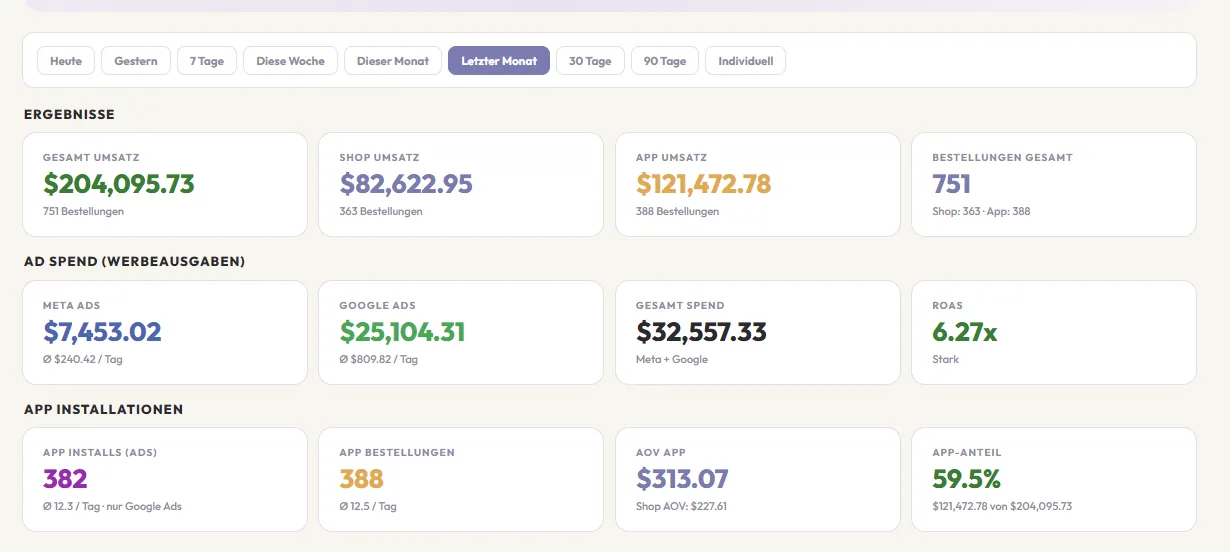
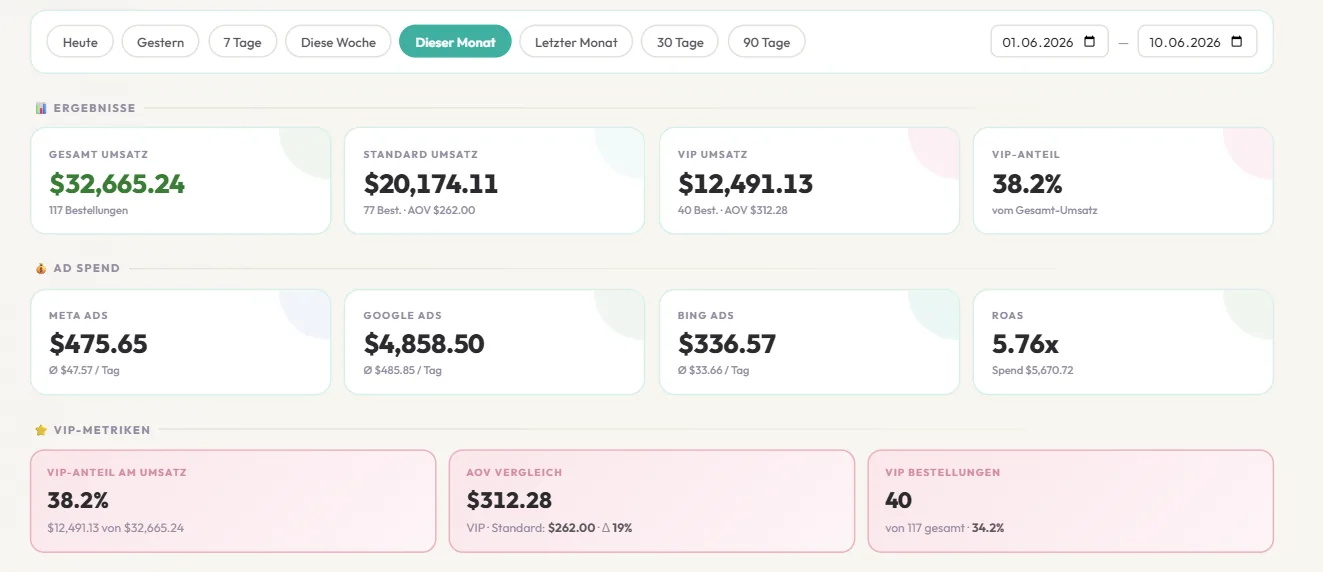
Looker Studio (ex Data Studio) is fine — until it isn't: slow loading, connector limits, and as soon as you need a metric that isn't in the schema, you're stuck. We build dashboards as standalone web apps: your data sources connected directly, your KPIs calculated the way your business works, fast to load and without license drama.
Two examples from real setups: shop vs. app revenue with ad spend and ROAS at a glance, next to a VIP customer board with revenue share and AOV comparison — metrics no standard connector offers. This is about building the boards; what we derive from the numbers — recommendations, budget decisions, weekly cadence — is reporting, which lives in performance marketing.
Dashboards at rulers
Standalone web apps instead of template tools, direct connection to shop, ads and CRM, custom metrics (contribution margin, cohorts, VIP segments), alerts when numbers tip.
Read more →09 — Interplay
Data is the start. Budget is the point.
A perfect tracking setup nobody acts on is just an expensive mirror. The value appears when someone reads the numbers and moves budget: scaling campaigns that pay into contribution margin, and switching off what only paints the dashboard green. That is exactly our job in performance marketing — tracking and media buying from one team means no translation loss between "what the data says" and "what happens in the account".
Typical sequence: tracking foundation first (2–4 weeks), then campaigns on clean data. Do it the other way round and you optimize blind — and clean up twice later.
If you don't trust your numbers
Tell us briefly what you track, with what (GA4? GTM? CMP?) and where it hurts. We'll look at your setup and tell you honestly what's good and what isn't. First call free, 30 minutes.