The data source: starting point in Ads Manager
All tracking in ChatGPT Ads hangs off a data source. It is created in Ads Manager Beta under Tools and Conversions and provides the pixel ID that both pixel and Conversions API later attach to. The dialog is unspectacular, but one detail in it matters:
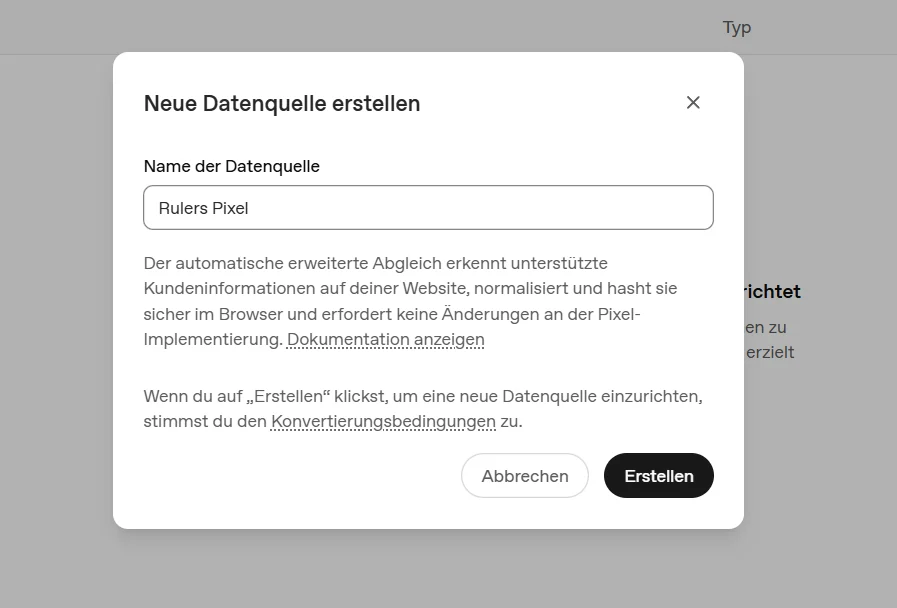
"Automatic advanced matching" is OpenAI's version of what Meta calls Advanced Matching: the pixel detects supported customer information on the page (email, phone number, name, city, postal code, external ID), normalizes it and hashes it with SHA-256 right in the browser. According to the documentation, the raw data never leaves the browser; only the hash is transmitted. That improves conversion matching, and it is at the same time exactly the kind of data processing that belongs in the privacy policy and behind consent, more on that below.
Twelve base events and custom events
Custom conversions in Ads Manager are built on a base event. The list is deliberately short and covers shop, lead gen and app:
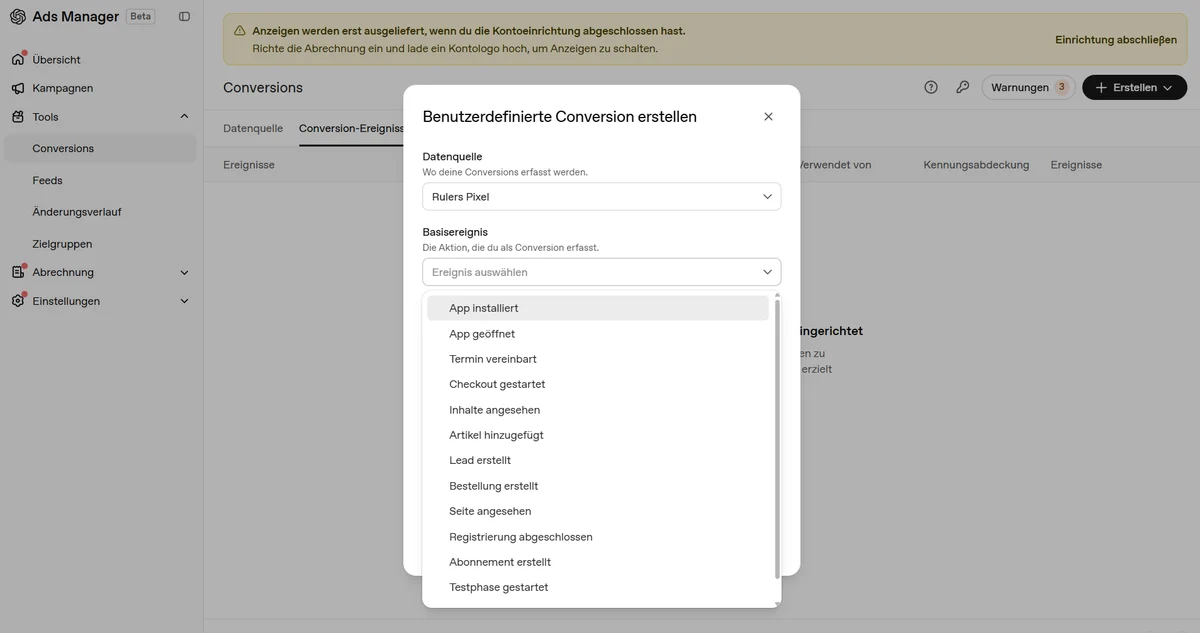
Technically the twelve events are page_viewed, contents_viewed, items_added, checkout_started, order_created, lead_created, registration_completed, appointment_scheduled, subscription_created, trial_started plus app_installed and app_opened. Two specifics: the browser pixel does not support the two app events, they run exclusively through the Conversions API. And anything that fits no drawer goes as a custom event with its own custom_event_name (1 to 64 characters); values like amount, currency or cart contents can be attached.
The oaiq pixel in the browser
The pixel is a JavaScript SDK loaded from bzrcdn.openai.com and initialized with the pixel ID:
<script async src="https://bzrcdn.openai.com/sdk/oaiq.min.js"></script>
<script>
  window.oaiq = window.oaiq || function(){(oaiq.q = oaiq.q || []).push(arguments)};
  oaiq("consent", false);            // before init: set to true only after consent
  oaiq("init", { pixelId: "PIXEL-ID" });
  // after consent: oaiq("consent", true);
  // report a conversion, e.g.:
  oaiq("measure", "order_created", { id: "order-123", amount: 49.9, currency: "EUR" });
</script>
When someone clicks an ad in ChatGPT, they land on the target page with an identifier; the pixel turns it into the first-party cookie __oppref and uses it to attribute later events to the click. That only works if the pixel actually loads on the landing page, and it is why the attribution chain breaks in the same place as crawling: if you block OAI-AdsBot via Cloudflare or robots.txt, your ad does not even get served; if a consent mistake keeps the pixel from ever loading, you get clicks without conversions.
The Conversions API: the reliable rail
The second rail sends the same events from your own server to bzr.openai.com/v1/events, authenticated with an API key from Ads Manager. It is immune to ad blockers, ITP and abandoned page loads and therefore the more reliable source, analogous to the Conversion APIs of Meta, Google and TikTok. The rules from the documentation you need to know:
- Required fields: event ID, type, timestamp in milliseconds (at most 7 days back),
action_source, and for web events thesource_url. - Bring attribution yourself: unlike the pixel, the API does not read the click identifier automatically. The
__opprefcookie must be read in the browser, passed to your server, and sent with the server event. Without it the server event exists but cannot be attributed to any ad. - Deduplication: OpenAI deduplicates via pixel ID, event name and event ID; the first event received wins. Pixel and API must send the same event ID, then nothing counts twice.
- Batches: up to 1,000 events per request, but all-or-nothing: one faulty event fails the whole batch. There is
validate_onlyfor testing. - Customer data (email, phone, name) leaves your server only as SHA-256 hashes here too.
Consent and GDPR: the pitfall
Now the point that gets lost in most setup guides: according to OpenAI's documentation, the pixel's consent state defaults to true. Copy the pixel code into your page or tag manager as-is and you track from the first second, without anyone having consented. In the US that is irrelevant, in the EU it is not. The clean order: oaiq("consent", false) before init, wired to the consent banner, and only after consent oaiq("consent", true). Important for expectations: events occurring while consent is denied are not replayed. A share of conversions stays invisible for consent reasons, as with every other pixel; the Conversions API with server-side consent checks softens that.
Then there is the formal part: pixel and advanced matching are consent-requiring data processing, so add OpenAI as a vendor to the consent banner and to the privacy policy. How we build consent setups in general is on our Consent Mode page.
Our setup in practice
- Create the data source in Ads Manager (Tools, Conversions), note the pixel ID, decide consciously about advanced matching.
- Roll out the pixel via the tag manager, with the consent state firmly wired to the banner (see above) instead of hard-coded.
- Define events: for shops
order_createdwith amount and currency as the main goal,checkout_startedanditems_addedas diagnostic events; for lead genlead_createdorappointment_scheduled. - Set up the Conversions API in parallel: pass the __oppref cookie to your server, send the same event IDs as the pixel, test with
validate_only. - UTM discipline: static URL parameters survive the ad click. Your own convention (say
utm_source=openai) makes the channel visible in GA4 and the shop backend, independent of OpenAI's own reporting. Rules as in our UTM generator. - Test purchase before campaign start and check that the event arrives in Ads Manager and counts exactly once.
If you would rather not build this yourself: this is exactly the setup we are installing for our first clients right now, and we have been measuring campaigns across platforms since 2006. Details on the ChatGPT Ads agency page or directly via contact.
What measurement cannot do yet
Honesty is part of it; the Ads Manager wears its beta label for a reason. Reporting shows impressions, clicks, spend, CTR, CPC, CPM and conversions; view-through conversions use a fixed one-day window and are reported separately, outside the conversions column. From US experience, reporting arrives with several hours of delay, and a relevant share of purchases happens after the click session anyway. Third-party attribution and MMP integrations are still early. Practically: do not re-steer targets on morning numbers, keep GA4 and the shop backend as a second opinion, and give the channel a fair measurement window before deciding on scaling.
FAQ
Do I need both pixel and Conversions API?
Both. The pixel delivers attribution via the __oppref cookie, the API delivers reliability. Send the same event IDs and OpenAI deduplicates cleanly.
Can the oaiq pixel be used GDPR-compliantly?
Only with consent wiring. The default is true, so set it to false before init and release it only after consent. Blocked events are not replayed.
Which events exist?
Twelve base events from page viewed to trial started, plus custom events. App events only via the Conversions API.
Why do conversions arrive hours later?
Reporting delay plus user behavior: many purchases happen after the click session. Do not optimize on morning numbers.